

Why you should invest in Digital Marketing during the Corona virus outbreak
During these unprecedented and difficult times, there are many business owners who are trying to minimise financial risk for their business by pausing advertising efforts or cutting advertising spend.
This could be seen as a short term and temporary fix but eventually, this will lead to needless lost time and effort later on when it comes to rebuilding your marketing strategy from scratch.
So could this be the time to re-evaluate your existing budget and invest more in Digital Marketing? This blog explains why continuing with your marketing efforts is now more crucial than ever.
Grow your online presence & connect with your clients.
Following the government announcement regarding halting the spread of the virus, people are spending more time online and are using social media to connect with others. So this is the best time to grow your online presence and get more people to engage with your brand.
This could include working on your website to improve rankings and increase your site’s visibility when someone is searching for a particular product or service and being more active on social media. Even if your business is currently closed, you can still use social media to stay in contact with your current clients by showing your empathy and support during the outbreak or posting about small steps you have taken as a business to help people in need.
Make sure that information on your website or social media is up to date and keep your clients posted about any changes in regards to your services.
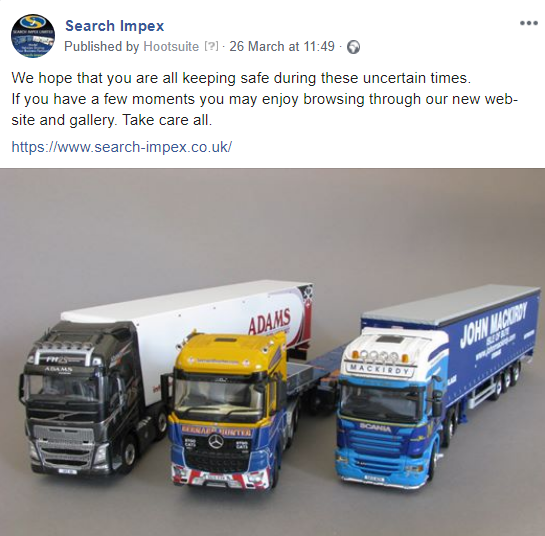
Covid-19 Update on Facebook…
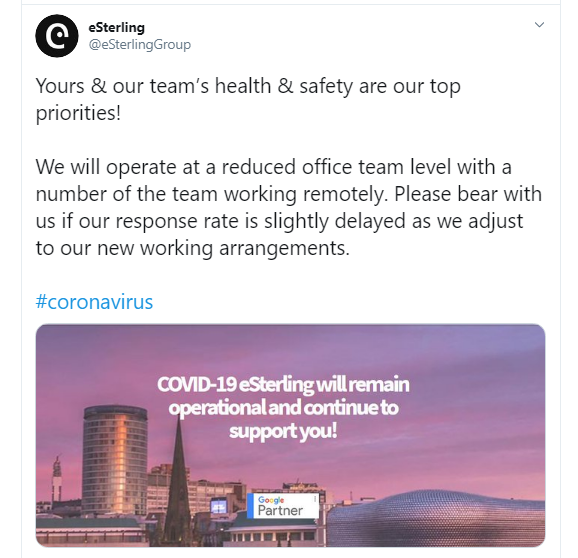
Covid-19 Update on Twitter…
If you are not familiar or confident using social media, eSterling offer a complete Social Media Management service. We can manage your social activity and provide you with reports to track your online performance and engagement.
Understanding the importance of Search Engine Optimisation (SEO).
Search Engine Optimisation (SEO) is a process which includes a number of steps and actions that aim to increase the quantity and quality of traffic to your website via organic Search Engine results. SEO is a long term process and the results are not immediately obvious. So now is the right time to invest in SEO so that your website is fully optimised for when the sanctions are lifted and business returns to normal levels.
eSterling are experts in all things ‘SEO’ and our SEO services provide regular reviews, up to date reporting and on-going support. We make sure the site is fully optimised and that you are targeting the right keywords as well as resolving all technical issues.
That gives you a big advantage over your competitors as many of them may have not looked at their SEO campaigns.
Time to invest in content.
Content is one of the main ranking factors for all Search Engines and Google has made it clear that a great content strategy can increase traffic and in-turn improve rankings. During these days people are spending many hours browsing the internet and reading articles. You should focus on updating your website’s content and optimising pages for desired keywords for your products or services.
Don’t forget to add or update your blog section with interesting and informative content to keep your customers engaged, even if your company is closed or you are not operating usual hours.
Take advantage of our copywriting services and we’ll create well-written, original and engaging content based on your brand and target audience.
Start online advertising by creating profitable Pay Per Click (PPC) Campaigns.
People are staying at home and searching for products and services online, so you could take advantage of the increased search volume and invest in PPC advertising. With Google Ads you’re in control of the money you spend and are only charged when someone clicks on your ads so most of the clicks will come from customers who are looking for your products or services.
If you have already set up PPC campaigns and your business is still operating then it is worth leaving these campaigns running as your customers may still be looking for your services or products.
Should you have any questions about online advertising and PPC, don’t hesitate to get in touch. Here at eSterling we are still fully operational and can help you with online adverting and offer full support throughout this period and beyond.
Focus on your website and improve User Experience.
With daily traffic at an all time high, now could be the right time to think about a new website or a redesign of your old website to improve user experience. You need to make sure that your website is mobile friendly, the page speed is good and navigation is easy with clear structure and defined call to actions on all pages.
If you are not currently selling products, now is a great time to convert your site into an eCommerce site or improve your existing site since most of the transactions are taking place online. With so many people in quarantine and not being able to go to the stores, eCommerce sales are booming!

Invest in eCommerce.
We have years of experience in designing and building websites and we always endeavour to build sites that exceed your expectations and generate you more business. Give us a call to discuss your project & requirements today!
What’s Next?
At some point in the future this pandemic will pass, so you will need to make sure that you’ve got your business ready to go. Investing in your online strategy now, will reap the rewards further down the line.
We are here to help! We can help you promote your business online and develop an effective and measurable Digital Marketing strategy.
Call us on 0121 766 8087 and tell us what you want your website to do for your business.

The Importance of Product Page Content for eCommerce Websites
Product pages often serve as one of the most important landing pages on your website. If a user is searching for a specific product, organic and paid search results are more than likely to be filled with product pages.
This means that your product page needs to provide the perfect amount of information for users and for search engines.
Here’s a checklist to ensure your product pages are performing well in search and reaching the most customers possible.
Product Descriptions
All good product descriptions should clearly and concisely explain what the product does, use language familiar to your target customers and communicate why someone should choose this product over a competitors.
Product descriptions should be written for customers first of all – with a clear tone of voice, persuasive wording and appropriate length. Descriptions that do this and demonstrate the clear value of your products will be a vital tool for leading your customers through the sales funnel.
However, just as important as selling to potential customers is product copy that targets the most relevant keywords users are going to be searching in Google. Search engine crawlers determine what a product page is trying to sell by scanning and reading the content. If you haven’t included what could potentially be searched by consumers in your copy, you could be missing out on a lot of search traffic. Keywords should be included naturally into the content, and not stuffed in just for the sake of SEO.
Product descriptions should also be unique for every product. Duplicated content can be a significant issue for SEO and should be avoided when possible, especially for large eCommerce websites.
Product Specifications & Information
Online customers are lazy. When viewing a product page, they want all the information they need in front of them and are often put off by having to click through to other pages to find what they need.
This is why all relevant product information should be clearly displayed on product pages. This can include prices, shipping costs, product size, product colours, and technical information.
Including as much relevant information as possible is always useful to the customer as they can understand the product completely by viewing one page. This will encourage them to move them down the conversion funnel in the simplest way possible.
Product Images/Videos
Product imagery is often the first thing a customer will see on a product page. For this reason, you should ensure that your products images look as desirable and as high quality as possible.
9 out of 10 users have said that product images directly affect their purchasing decisions, so it’s vital to get it right.
Every image should be as high quality as possible while still staying under image size guidelines. Images that are stretched or too compressed will instantly send red flags to potential customers.
A range of images that shows your product from different angles is also preferable, especially if your products are dependent on their aesthetics. Having multiple images for each product variation is also a great way to show your customers exactly what they are buying.
Aside from just looking great, your images need to be helpful and answer questions your customer may have about a product. An image needs to give an idea of how it can be used and why they need to buy it.
Videos have also become a useful tool for eCommerce sites. Including videos on your product pages allows sites to give a much deeper insight into a product than a simple image. A video can include voice over and in-depth product demonstrations. This can be a powerful way of showing why a customer should purchase a product.
Product Reviews
Social proof is a powerful tool within eCommerce. Seeing what someone else thought of a product can be one of the main things that helps a user decide on making a purchase.
The immediate benefit of reviews is that they can make your future customers feel that much more confident. Having this clearly displayed on a product page increases the chance that they a user will make the decision there and then.
If you need help on creating the best product pages possible, get in touch with eSterling! We are experts in eCommerce web design and digital marketing and have the knowledge and tools to help you create product pages that get users to click that buy button!

Headline writing tips to get more business
Browsers are fickle. If you want to convert a visitor into a customer you need to instantly grab their attention. Beyond eye catching images, bullet points and benefits (not features!) you need to focus on your headlines.
In the world of content strategists and copywriters they call this microcontent and we’re going to show you how to improve yours.
You only get a sentence, that’s 40 to 60 letters, to work with. That’s a lot less that a tweet so every word counts. This kind of text is also displayed usually without context. Sure, it may be displayed with an image but often those are a little generic or abstract. Because of this you have to write a headline that stands on its own.
Here are a few hints on writing that perfect line of text.
Be clear in what your message is.
Your headline has to be appealing. What are you offering? Why does this benefit the customer?
It has to be relevant to both the site and to the reader. Match the headline to the content.
Be credible. Don’t over exaggerate or make claims that simply are not true.
Be sure to “front-load” your headline. That is, putting the most valuable phrase at the beginning.
Use numbers. “10 reasons good headlines improve online sales!”
Use powerful words like “free” and “imagine”.
Try phrasing your headline as a question. “Want to get more business by writing the perfect headline?”
Be succinct. Remove unnecessary words.
Focus on what the customer will find desirable.
“We promise you this: you are now ready to write great headlines”
Update Your Content Now!
Sorry to sound bossy, but if the content hasn’t been updated on your website for a while, make sure you do it now!
The reason for my urgency is the latest update from Google. This mini amendment to the search engine’s algorithm is rooting out out-of date or spammy content. This means that if you haven’t updated the content on your website for a long time, you may see your keyword rankings drop, or even disappear altogether.
Before you panic at this news, it’s important to remember that Google (usually) makes updates that benefit the user – i.e your customers. No customer wants to read outdated content on your site, so why should Google rate your site if your copy is old?
The most successful websites add fresh content regularly, so you should therefore get into the habit of updating your content often. The easiest way to do this is to start a blog and write posts regularly. This doesn’t have to be a huge job – just a couple of paragraphs weekly would be a good place to start. You can talk about anything you like – industry opinions, company news, new orders, business trips etc – just make sure it’s relevant and well written.
As part of your content overhaul you should also re-write the text on your homepage and about page (plus any other pages that have text present). I have lost count of the number of websites I have seen that display the names of long-gone members of staff, old addresses; or information about an event that happened years ago! Make sure you amend these details as soon as they happen to keep your website fresh and relevant for your customers – and Google will be happy too.
How Do You Spell Success for Your Website? Correctly!
I can’t stress the importance of using correct spelling and grammar on your website enough. Poor spelling creates a bad first impression that can leave a lasting effect when customers choose to shop with your competitors rather than you.
It may surprise you that poor spelling can also harm your SEO efforts. If you repeatedly spell one of your keywords incorrectly, it could have a negative impact on your search engine results because Google won’t be able to find that keyword in the text. If your text is littered with errors it could also lead Google to the conclusion that your site doesn’t have anything useful to say!
It really does pay to get little details right on your website as it creates a good first impression and pleases the search engines. Take some time today to read through your website text and make any corrections that are needed.
Follow these top tips for getting your content right every time:
- Write your content in Word and copy and paste this into your CMS – this will help you to spot spelling and grammar mistakes.
- Read what you have written out loud – it’s the best way to check how your content ‘reads’.
- If in doubt, print your content out. This way you can edit it with your red pen, or give it to a friend or colleague to read.
- Beware of American spelling. Americanisms can lead your customers to the conclusion that you are based in theUSA, which could put them off buying from your site. American spellings can also be confusing toUKsearch engines.
How to write content for your website
When you’re asked by your web agency to write some content for your new web site all you really have as a guide are the page titles (About Us, Company Overview etc.). It’s hard to know what to write about, let alone find the spare hours to write it. That’s why we as Web Designers appreciate it must be difficult to start writing when the day-to-day running of your company takes up so much time.
To get you started here are a few small tips on how to write the perfect content for your web site quickly and painlessly.
What to Write About
What is your industry? Where are you based? What areas do you cover? What are your products? Do you offer services? Why are you different from other companies in your industry?
These are all questions that will need to be answered pretty quickly when a potential customer lands on your web site so answer these questions immediately. Try not to write long sentences and paragraphs if possible – this will immediately turn a potential customer away. Make your copy punchy and interesting, don’t just list the facts – make it personable.
How to write your content
Always bear in mind your ideal keywords when writing for your web site. You may have heard about ‘Keyword Rich Content’ – this is basically a way of writing that includes the words or phrases your potential customer would type into a search engine to find your business – USE IT! A bullet point list is always easy to follow and is a great way of listing services and products.
…and remember, you’re selling your company to the world!
What to do once your content is written
Run spells checks and re-read it all. Here at eSterling we always double check the content our customers send us and we can improve where necessary. Send it to your Web Designers on a word or similar document.
This is just a small article on writing content for the web so if you need any more help please call our help desk on 0121 766 8087 and they will be able to go through all this in greater detail.
Conversion Rate Optimisation
Here are some simple ways to increase you ROI via conversion rate optimisation.
1. Be Relevant
Your ad text or meta description should always be relevant so the user will know what to expect when they arrive on your website. There is no point making wild claims that are not reflected on the site as this will just lead to poor bounce rates. Make sure that you use the keyword in your H1 title as this will help with both users and search engines. Perhaps one of the most vital points to consider in term of relevancy for the user is to use an accurate image. All to often I see generic images used on eCommerce sites, this will do nothing to improve sales. Always use your keywords in crawlable areas of the page as well utilising keywords in the domain if you can.
2. Proposition
You must quickly and simply portray your business proposition to your customer, frame the product or service in your opening text, ensure you prioritise your key features and benefits, consider the best way to get your point across – text, image, Video? Next try to see it from your customers point of view, see if you can handle any objections or concerns they may have about purchasing from you. One final point to consider is not to overwhelm the the user, do not be tempted to bombard them with too much information – an alternative may be to include downloadable demo, white papers or fact sheets. Always use a call to action.
3. Trust
The more trust your site can instill in the user the more sales it will make. This statement is so true for on-line shops. This can be done by the site itself as well as in the promotion of your company brand and the product/service brand. Your main enemies here are scepticism brought about by lack of information, not including reputable 3rd party ratings/awards and badges, and not have an SSL or payment system from a good provider. Try to use trust inspiring text, for example point it out if you have secure check out system, include testimonials in either text or video format. In terms of the web design you need to have a clean and tidy looking site, it should look professional and not rushed or cheap.
4. Understand User Intent
Try to find out what your typical customer responds to, try varied approaches and stick with the one that works best. You could try a softer call to actions or a harder approach, you may wish to experiment with different web designs and ways of presenting data, perhaps you will convert better if you can engage with the customer in a phone call? The key with all the things you try to is to ensure that you have a tested it in a fair way and to measure your success. Once you have a good amount of data you can choose the best way to proceed in terms of your customers intent.
5. Remove Distractions
Remember that the more obstacles you put between the moment a user enters your site and the point of sale the more likley it is that the sale will not complete. Your sales process should be simple, linear and as easy as possible. Common issues are including global navigation on your PPC landing pages, not using technology’s like JQuery to stop users from leaving the sales funnel by utilising tabbed pages of JS overlays to keep users on the page, off topic text and distracting images, asking for too much information from the user just to make the sale.
To find out more about conversion rate optimisation, get in touch with us here at eSterling.
It Pays to Proof Read
Like Tom said last week in his blog post, it only takes three seconds for a customer to make up their mind about your website. If you want your company to come across in the correct light, you must make sure the text on your website is error-free. Spelling, punctuation and grammar must be correct – no excuses!
I know my blog post is starting to sound like a rant from your English teacher, but trust me – good English on your website is an absolute must. Errors in your copy reflect badly on your company because glaring mistakes look unprofessional – especially if a typo gets in the way of the message you are trying to put across. Put yourself in your customers’ shoes – if you can’t get your copy right, will they want to trust you with their money?
Here are my top tips for making sure your website is error-free:
• Write any text for your website in Word. This means you can easily spell-check your writing for errors.
• Get someone else to proof read your text. It’s easy to miss your own mistakes, as your eyes will read what they want to read! Ask a colleague to check your writing, or if you’re alone in the office, read it aloud – you will often spot mistakes this way.
• If in doubt, print it out. It’s hard to read a page of text carefully off a computer screen. Printing your copy to check it will help you to find errors, and you can also write on any corrections to remind yourself to make changes later on.
Taking a little extra time to proof read your website costs nothing – so make sure you do it today! And if you need a little extra help, give eSterling a call for Copywriting services.
Why is Duplicate Content Bad for my Website?
Nobody likes a copycat – especially Google. That’s why having content duplicated on multiple websites is a big no-no when it comes to SEO.
Google will reward your website for having unique content – and will punish accordingly if it doesn’t. Using the same copy from the web throughout your site, for directory listings; or even copying and pasting from another site (naughty you!) can seriously harm your search engine rankings.
We have recently been working with a website which had great rankings throughout Bing, Yahoo and other major search engines, but was not getting anywhere in Google. A search using Copyscape showed that the content on the home page was also being used in a number of directories such as Applegate.
Google was therefore penalising the website thinking that the text had simply been copied from the directories. By re-writing the content for the directories we recovered the search engine positions for this site in Google – happy days!
Make sure that you check your site for duplicate content – and each time you join a directory don’t just copy and paste! Take a little time to re-write your content and Google will love you for it. And if your copy is sloppy, simply get in touch with us about our copywriting service.